Batches group many individual sends into one managed unit you can track and cancel — each going to a contact who opted in, paced through the full anti-ban pipeline. This is notification/personal messaging, not blasting strangers. (Sending identical content to many contacts is blocked by default — vary your wording.)
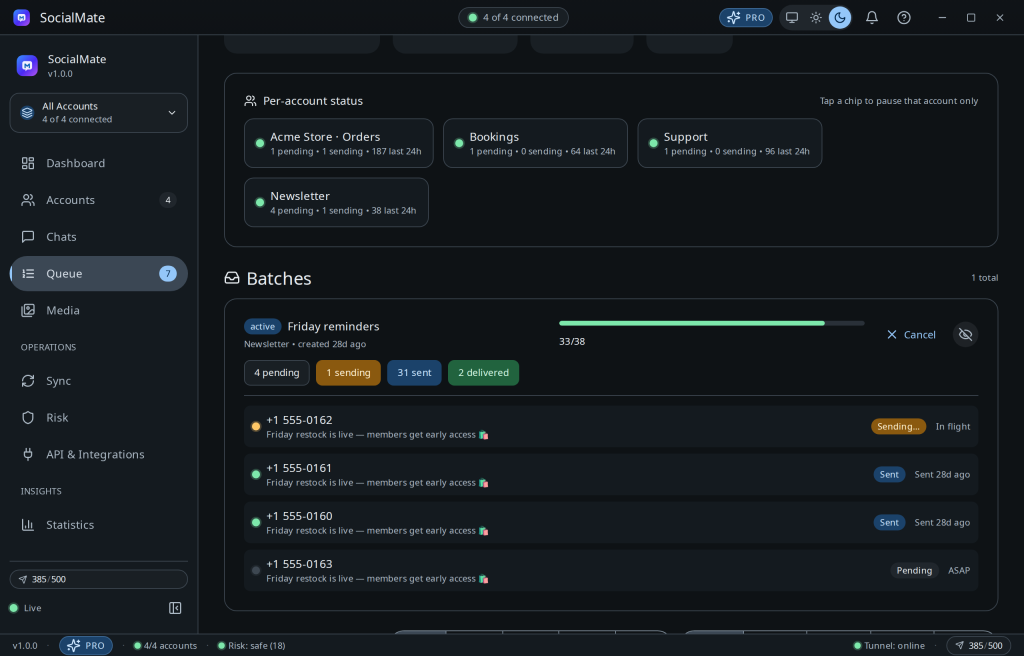
How batches work
- Create a batch; each item is queued and paced by the engine.
- Track enqueued → processing → sent / failed per item, and the batch as a whole.
- Cancel the batch at any time — in-flight pacing means you’re never committed to an instant flood.
Use responsibly. Only message people who opted in and expect to hear from you. Unsolicited bulk messaging is the fastest route to a ban — and it violates our terms. See How to message responsibly.
Pro. Batches and scheduled queueing are Pro features. Compare plans →
Was this helpful?
Thanks for the feedback!