With a number linked and connected, you can send right away. Every send — from the UI or the API — passes through the anti-ban pipeline, so it’s paced like a human from the very first message.
From the app
- Open Chats, pick a conversation (or start one with a contact).
- Type your message and send. Text works on every tier; media and group sends are Pro.
- Watch the dashboard — messages today ticks up and your risk score stays in the safe band.
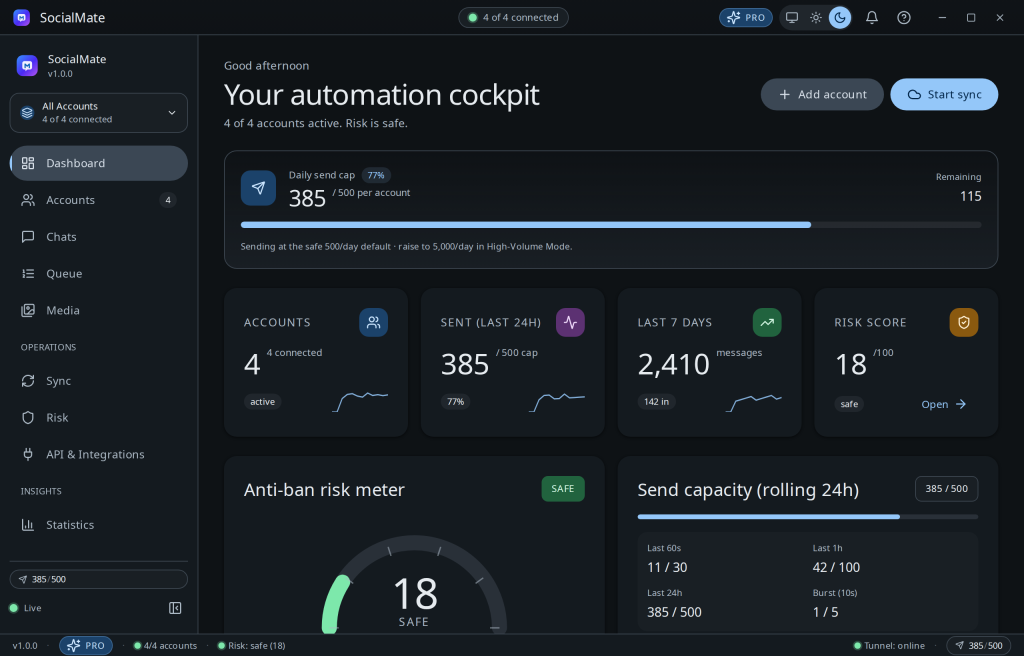
From the local API
Prefer code? Turn on the API in Settings → API, copy your x-api-key, find your account id, then send to a chat (chatId is a WhatsApp JID — a number followed by @s.whatsapp.net):
# 1) list your accounts to get an id
curl http://localhost:3456/v1/accounts -H "x-api-key: YOUR_KEY"

# 2) send a text message (text works on Free; media is Pro)
curl http://localhost:3456/v1/accounts/ACCOUNT_ID/messages
  -H "x-api-key: YOUR_KEY"
  -H "Content-Type: application/json"
  -d '{"chatId":"[email protected]","text":"Hello from SocialMate"}'
Tip. New number? The session warmer caps your first day low and ramps you up over ~72 hours. That’s deliberate — it’s the single biggest thing protecting a fresh account. See Warming new numbers.
Where to go next
Learn the local API, set up webhooks, or read the honest ban-risk explainer before you scale up.
Was this helpful?
Thanks for the feedback!