Send a message
say — one short bubble at a time, with a quote-reply when it answers an earlier message.
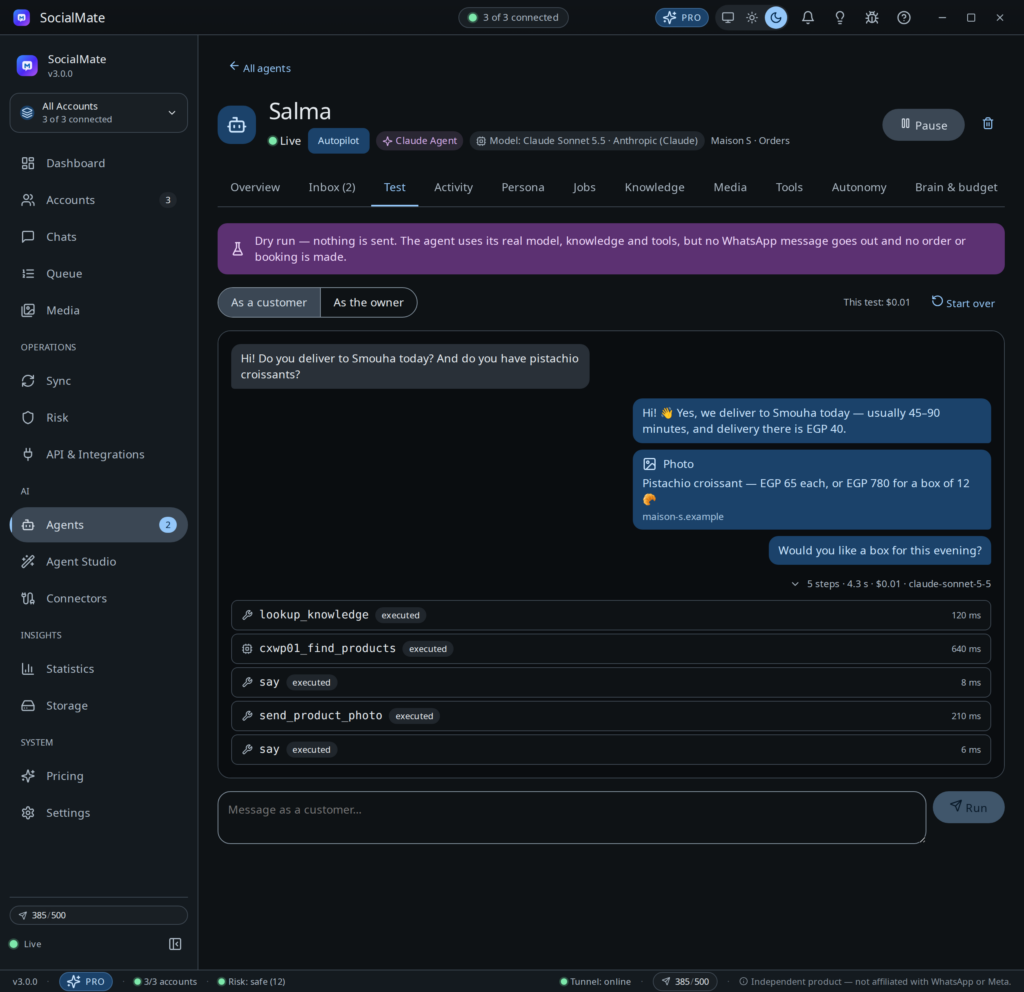
31 built-in tools, 19 jobs, voice notes and photos, knowledge and memory — and a test console that shows every step before a customer sees a word.
lookup_knowledge · delivery areas
set_followup · in 48 h
remember · paid on Thursdays
Claude Agent · Model: Claude Haiku 4.5
The agent acts only through tools. Each act lands in the reply and is delivered through SocialMate’s paced sending — or held for you, depending on autonomy. Owner tools only work in a chat with one of your owner numbers.
say — one short bubble at a time, with a quote-reply when it answers an earlier message.
react — one emoji on a message, like a person would.
send_media — an image, video, document or audio from your media library, with a caption.
send_sticker — from your media library.
send_voice_note — the reply spoken in a natural voice; anything to copy goes in text.
send_product_photo — only images hosted on your own connected website.
send_location — a saved place, such as your shop, as a WhatsApp pin.
send_poll — 2 to 12 options when a tap is easier than typing.
send_contact — your delivery team, a branch or the manager, from the library.
pause — wait a few seconds before the next message, like someone looking it up.
escalate_to_human — to the owner or a named team member, with the reason and urgency. Then it stays quiet in that chat.
mark_resolved — with a one-line summary of what was done, shown to you.
set_followup — come back later as promised; cancelled if the customer writes first.
tag_contact — labels like lead, wholesale or vip, so you can sort and follow up.
save_contact_details — the name, email, company or note a customer gave about themselves.
lookup_knowledge — search your policies, FAQs, prices and descriptions.
remember — a useful fact about this customer for next time. Never passwords, card numbers or health details.
get_earlier_messages — page back through this chat to the very first message.
search_chat — find an order number or a product they mentioned.
get_contact_profile — name, notes, tags and remembered facts.
get_datetime — now, in your business time zone.
list_media — the photos, stickers, locations and cards it may send.
web_search — when you allow it; results are treated as untrusted text.
stats_today — conversations, replies, hand-offs, approvals waiting, tokens and cost.
list_handoffs — chats currently with a person.
resume_chat — give a handed-off chat back to the agent.
list_followups — what it has promised and not sent yet.
list_approvals — every action waiting for you, with its details.
decide_approval — approve or reject, only when your own message says so.
pause_agent — stop or resume it on this number.
search_all_chats — find words across every conversation on the number.
Connected systems add their own tools — 70+ from WordPress and WooCommerce, and whatever your MCP servers offer. See integrations.
A job is a switch on the agent. It adds its instructions and turns on the tools it needs. Some answer when a customer writes, some start when something happens on your site, and one runs on a timer.
Support and FAQs from your knowledge and website. On by default.
Find out what the customer needs, recommend, and capture lead details.
The whole order in the chat: basket, details, delivery, payment, confirmation.
“Where is my order?”, pay links, address changes, returns and problems.
Explain services, check the customer’s appointments, take booking requests.
Keeps its promises: “I’ll check and get back to you tomorrow” — and does. On by default.
When a conversation is resolved, asks for a one-tap rating and tags the contact with it.
Outside business hours, says when you are back and takes a message.
When you message it from an owner number: stats, approvals, drafting website posts. On by default.
When an order changes status on your website, tell the customer.
Remind customers of an unpaid order, with its payment link.
Check each new COD order with the customer before it ships; confirm or cancel it from their answer.
Remind customers of upcoming appointments.
Follow up website form submissions on WhatsApp — people who left their number.
After a completed order, ask for a review. Never pushes.
Gently remind opted-in customers about an abandoned cart.
Tell customers who asked when a sold-out product is back.
Any other event your website or automations send, acted on as you describe.
Every morning at opening time, a short summary on your WhatsApp: conversations, open hand-offs, approvals waiting, orders to ship or payments to check, and anything unusual.
Event jobs message the person on the event’s record — never someone the model picks. Marketing jobs (cart recovery, review requests, back in stock) need that person’s opt-in, and each event job writes to a person at most twice in twelve hours.
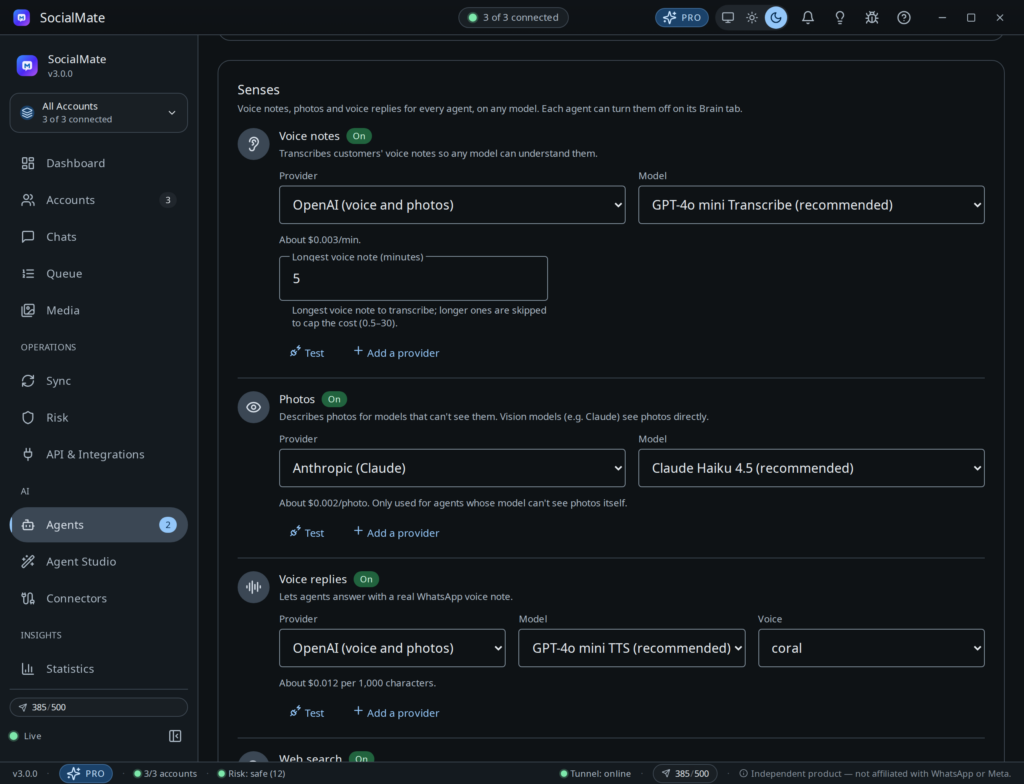
WhatsApp customers rarely just type. Connect the services you want for each sense; the agent handles the rest.
On by default once you connect speech-to-text: OpenAI, Groq (Whisper) or your own OpenAI-compatible server. You set the longest voice note it transcribes.
On by default. Claude, GPT and Gemini look at photos directly; text-only models get a description from a vision model — even a local one.
Voice replies are off by default: choose “When they send one” or “often”. Ten voices with OpenAI, or your own text-to-speech server.
Off by default. Claude models use Anthropic’s built-in search; other models use your Brave Search or Tavily key.
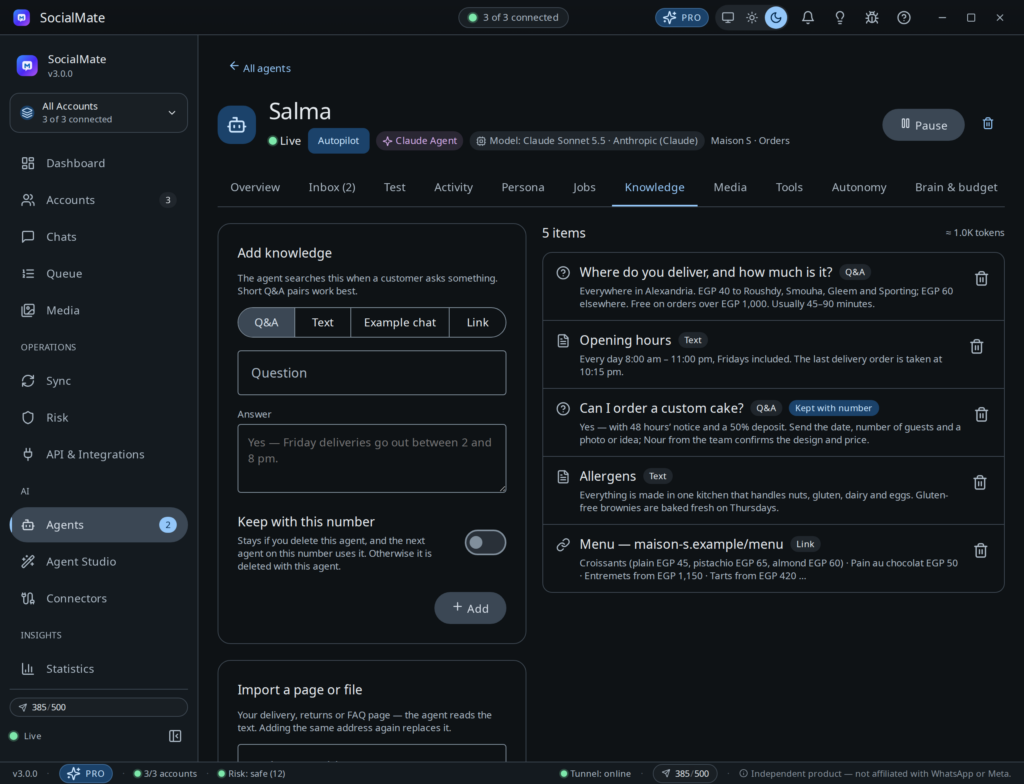
Give it facts, Q&A pairs, or a whole web page or text file. It keeps what it learns about each person on their contact, and a running summary of long chats.
Short messages, the customer’s language, and the sense to step back when a person is talking.
Languages are automatic by default — it answers in the language the customer writes in.
Read receipts, typing, a short wait for the rest of a burst of messages, and a few short bubbles rather than one wall of text.
When you or your staff type in a chat, it stays quiet there for 120 minutes by default.
Name your team (“Sara — company orders”) and each chat goes to whoever handles it; only that person is alerted.
Set business hours; outside them it stays silent or replies with when you are back.
Groups are off by default. Switch them on and it answers only when mentioned or replied to.
Chat with your agent as a customer or as the owner. It runs the real model with the real tools — your products, your orders, your MCP servers — but nothing is sent to anyone.
Yes, once you connect a speech-to-text service: OpenAI, Groq (Whisper) or your own OpenAI-compatible server. The note is transcribed and the agent answers it like a typed message.
Yes. Voice replies are off by default; turn them on for people who send voice notes, or more often. They are spoken by OpenAI’s text-to-speech (ten voices) or your own compatible server, and arrive as real WhatsApp voice notes.
Photo understanding is on by default. Models with vision — Claude, GPT, Gemini — look at the photo directly; text-only models such as DeepSeek get a description from a vision model you pick, which can be a local one.
From the knowledge you give it — facts, Q&A pairs, or an imported web page or text file — plus the tools of your connected website and MCP servers. When it doesn’t know, it says so and offers a person instead of guessing.
Yes. It saves short facts about each person (name, preferences, what they bought) and keeps a rolling summary of long conversations. It never stores passwords, card numbers or health details.
Only through event jobs you switch on — an order update, a booking reminder, a form follow-up — or a follow-up it promised. It writes to the person on that event’s record, never to someone the model picks.
Groups are off by default. If you switch them on, it answers in a group only when someone mentions it or replies to one of its messages.
Download SocialMate, link your number, connect the model you want and create an agent from a preset. Start a free 7-day Pro trial from inside the app — test it on your real questions before a customer sees a word.
Pro: $99/year or $10/month. Built on Anthropic’s Claude Agent SDK — the model is your choice.