The Claude Agent · Run it
Test before you go live
Real model, real tools, nothing sent.
Pro
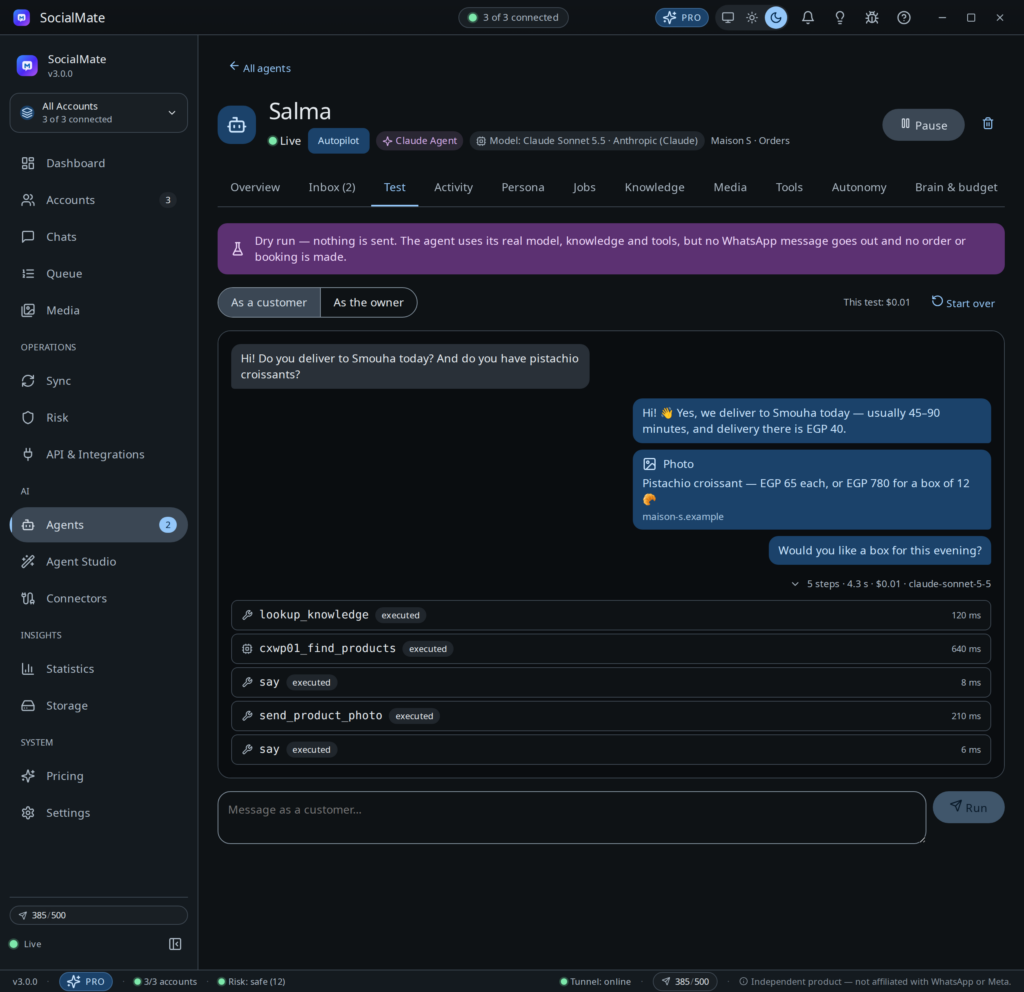
The Test tab is a chat with your agent that sends nothing. Each run is a dry run on the real model, the real knowledge and the real tools — it can look up your real products and knowledge — but no WhatsApp message goes out and no order or booking is made. Use it before you go live and after every change.
1Open the Test tab
Open the agent and click Test. A new agent created in Observe mode opens here by itself. The banner reads Dry run — nothing is sent.
2Choose who you are
Switch between As a customer and As the owner. The customer view gets only the customer tools; the owner view gets the owner tools (stats, approvals, pausing), the way an owner number would on WhatsApp. Switching starts a fresh chat.
3Write and run
Type a message and click Run (or press Enter; Shift+Enter adds a line). Write the way a customer would — “do you deliver to Maadi?”, “my order is late”, a question in Arabic. The reply appears as WhatsApp would show it: bubbles, quotes, reactions, photos, polls.
4Open the step trace
Under each reply, a line shows N steps · time · cost · model. Click it to see every step in order: each tool the agent called, with its arguments and a short result. This is how you see why it answered the way it did — which knowledge it found, which product it looked up, whether it decided to hand the chat to a person.
Good to know
- It tests the saved version. With unsaved edits on other tabs, a note says “Testing the saved version — save to test your changes.” with a Save button.
- It uses your model, so it costs tokens. The running total shows as “This test: $…”.
- Limits: a test message can be up to 2,000 characters, and the agent reads the last 30 messages of the test chat. Past that it no longer sees the start; click Start over for a fresh chat.
- In Observe mode the console shows the draft it would write: “Drafted a reply (Observe mode) — nothing would be sent.”
- A message that tries to trick the agent is flagged: “Looked like an attempt to trick the agent — it was refused.”
- Test runs are listed in the Activity tab, marked “test”. Click any run there for Run details: model, latency, tokens in and out, cached tokens, cost, what it did and every step.
Scenarios worth running
- Your five most common questions, word for word as customers ask them.
- A question your knowledge does not answer — it should say it does not know and offer a person, not invent an answer.
- One of your escalation words (“I want to speak to a person”) and an angry complaint — check it hands over.
- A message in each language your customers use.
- With a store connected: find a product, ask about stock and price, and walk through an order up to the read-back before it is placed.
- Something your Rules forbid, such as a delivery-date promise or a discount code.
- As the owner: “how many chats today?”, “who is waiting for a reply?”, “pause the agent”.
Not happy with an answer? Fix it at the source — a Q&A in Knowledge, a line in Business facts or Rules — save, and run the same message again. Then work through the Go-live checklist.