The Claude Agent · Run it
Knowledge and memory
What it knows and what it remembers.
Pro
The agent answers from what you give it and from what it learns in each chat. There are four places it draws on, from the smallest to the largest:
- Business facts on the Persona tab — read on every turn.
- Knowledge — searched when a customer asks something.
- Contact memory — facts about each customer, kept between conversations.
- The chat itself — the WhatsApp conversation, back to the first message.
Business facts
Facts that rarely change go in Business facts on the Persona tab: what you sell, where you are, opening hours, delivery areas and times, return policy, payment methods. Keep it short — it is part of every turn. Anything longer belongs in Knowledge.
The knowledge base
1Add knowledge by hand
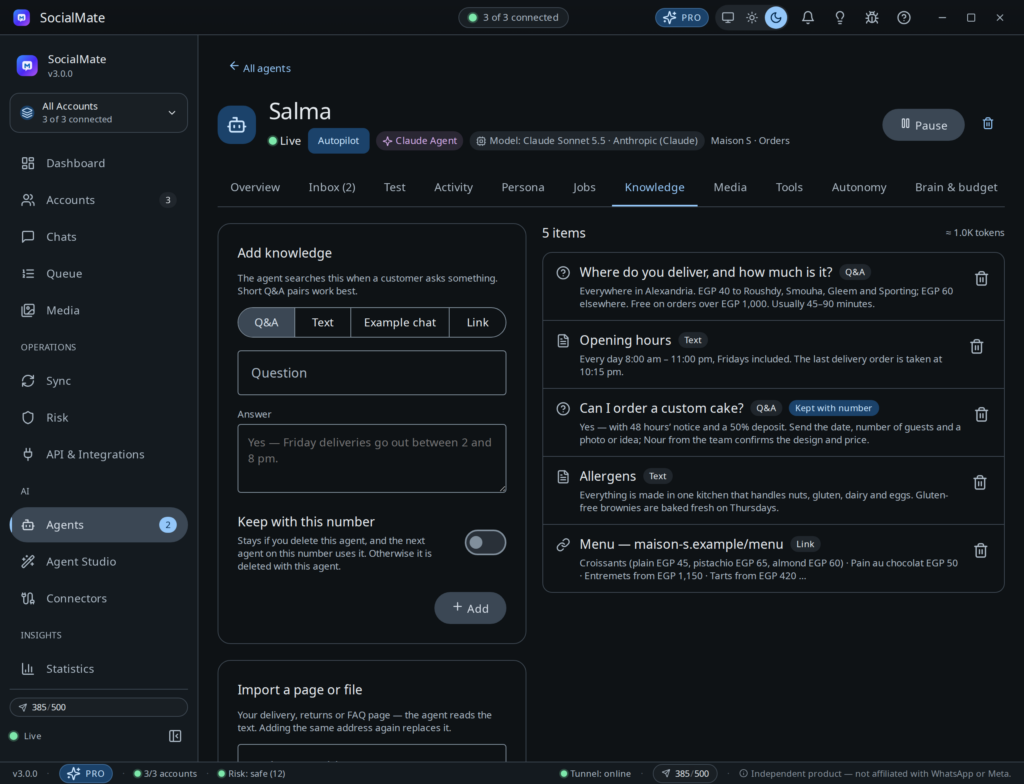
Open the agent’s Knowledge tab. Under Add knowledge, choose a type and click Add:
- Q&A — a Question and its Answer. Short Q&A pairs work best.
- Text — a Title and the text: a policy, a price list, a menu.
- Example chat — show the agent how a good reply looks, one line per message, starting with
Customer:orAgent:. - Link — a page address; the page is read and split into parts the agent can search.
Turn on Keep with this number to keep an entry when you delete this agent, so the next agent on the number uses it.
2Import a page or a file
Under Import a page or file, paste a Web page address — your delivery, returns or FAQ page — and click Import page. Or click Import a text file and choose a .txt, .md, .csv, .json or .html file. Importing the same address again replaces the old copy.
PDFs are not read yet. Paste the text of a PDF as a Text entry instead.
The list on the right shows how many items there are and about how many tokens they hold. Delete an item with its delete button; an item kept with the number is removed for good. In the wizard, the Knowledge step offers the same Q&A, Text, Example chat and Link types.
The media library
On the Media tab, add what the agent may send when it helps: a File (Photo, Video, Document, Sticker as .webp, Audio), a Saved location (latitude, longitude and an address) or a Contact card (a Contact name and a phone number). Give each one a Name and fill in When to send it — “When someone asks for the menu or prices” — so the agent knows when. Files are added from the desktop app.
Contact memory
When the agent learns something useful about a customer — their name, a preference, their budget, what they bought — it saves it with its remember tool, and reads it back next time with get_contact_profile (name, notes, tags and remembered facts). It is told never to store passwords, card numbers or health details. The newest 50 facts per contact are kept.
The agent also saves what a customer tells it about themselves onto the contact card — their name, email, company and a dated note — where you, the API and your automations see it; this fires the agent.lead_captured webhook. It can tag contacts too, for example with the rating from Rating after a chat.
Earlier messages and long chats
The WhatsApp conversation is the agent’s transcript, so whatever you typed from your phone is part of what it reads. Each turn it reads the recent part of the chat. For older messages it can page back to the very first one (get_earlier_messages) or search the chat for an order number or a product (search_chat). A long chat also gets a short running summary, so the start of the conversation is not forgotten.
Owners can ask the agent to search every chat on the number from WhatsApp (search_all_chats). See Run it from your WhatsApp.
Keep knowledge in sync from your CMS or CRM. The REST API adds and removes knowledge entries and teaches the agent facts about a contact. See Knowledge & contact memory in the API reference.