The Claude Agent · Run it
Voice notes, photos and web search
Hearing, seeing and speaking.
Pro
Customers send voice notes and photos. The agent can hear the first, see the second, answer with a voice note of its own and look things up on the web. These senses are set up once for every agent on the Agents page, and each agent then turns them on or off for itself.
Set up the senses
On the Agents page, the Senses card lists Voice notes, Photos, Voice replies and Web search, each marked On or Off. They are all off on a new install.
1Add a voice or photo service
If none of your providers can serve a sense, the card says so. Click Add a provider and add OpenAI (voice and photos) or Groq (voice and photos) with its key, then Save & test key. Groq is the cheapest for voice notes; OpenAI is the one that can also speak. See Connect a model.
2Pick a provider and model for each sense
For each sense choose the Provider and the Model (for Voice replies also the Voice). The line underneath shows about what it costs. A custom OpenAI-compatible service asks for a Model id instead. Changes are saved as you make them.
3Test it
Click Test under a sense. The result says whether it works, with a sample — for example the transcribed text.
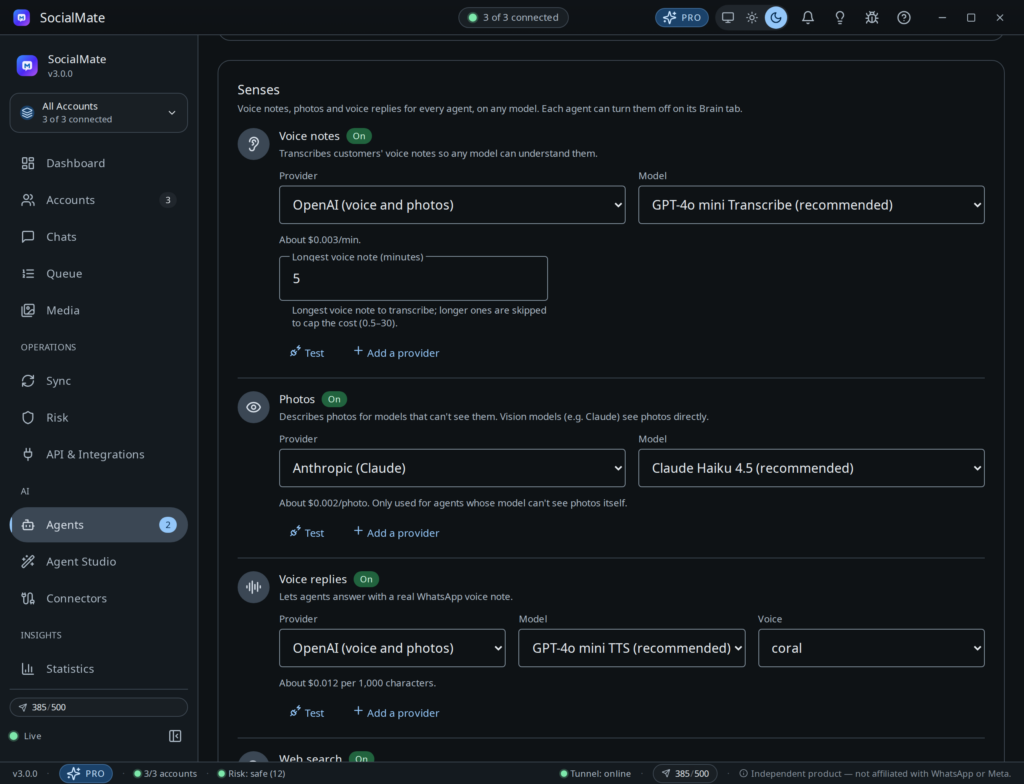
- Voice notes — Transcribes customers’ voice notes so any model can understand them. Longest voice note (minutes): 5 by default, 0.5–30; longer ones are skipped to cap the cost.
Served by: OpenAI (GPT-4o mini Transcribe, GPT-4o Transcribe, Whisper), Groq (Whisper Large v3 Turbo, Whisper Large v3), your own OpenAI-compatible server. - Photos — Describes photos for models that can’t see them. Only used for agents whose model can’t see photos itself — Claude sees them directly.
Served by: Anthropic (Claude Haiku 4.5), OpenAI (GPT-4o mini), Groq (Llama 4 Scout), OpenRouter (Gemini 3 Flash, GPT-5 mini), a local Ollama vision model, your own server. - Voice replies — Lets agents answer with a real WhatsApp voice note.
Served by: OpenAI (GPT-4o mini TTS, TTS-1; ten voices such as alloy, coral, nova and shimmer), your own OpenAI-compatible voice server. - Web search — Lets agents look things up online.
Served by: Claude models on the Anthropic provider: Anthropic’s own built-in search, nothing to set up. Every other model (including Claude through OpenRouter): your Brave Search or Tavily key.
Web search for non-Claude models
In the Web search row of the Senses card, choose a Service — Brave Search or Tavily — paste its API key, click Save and then Test. The app estimates about $0.005 per search with Brave and $0.008 with Tavily, billed by them. The key is stored encrypted on this machine.
Turn senses on or off per agent
On an agent’s Brain & budget tab, open Advanced options:
- Look at photos (default: On) — A model that can see uses the photo directly; a text-only model needs the Photos sense.
- Understand voice notes (default: On) — Works once the Voice notes sense has a service.
- Reply with voice notes (default: Never) — Never — always answers in text. When they send one — answers a voice note with a voice note; anything to read or copy still comes as text. Often — whenever a spoken answer fits; links and details still come as text. Needs the Voice replies sense.
- Search the web (default: Off) — Off by default — answers should come from your business facts and knowledge.
What the web says is treated as data, not instructions. Search results are fenced off from the agent’s instructions. If a result looks like an attempt to give the agent instructions, it is counted under Injection attempts, and for the rest of that reply website actions wait for your approval and owner decisions are refused.
The senses can also be read, changed and tested over the REST API: see Senses in the API reference.