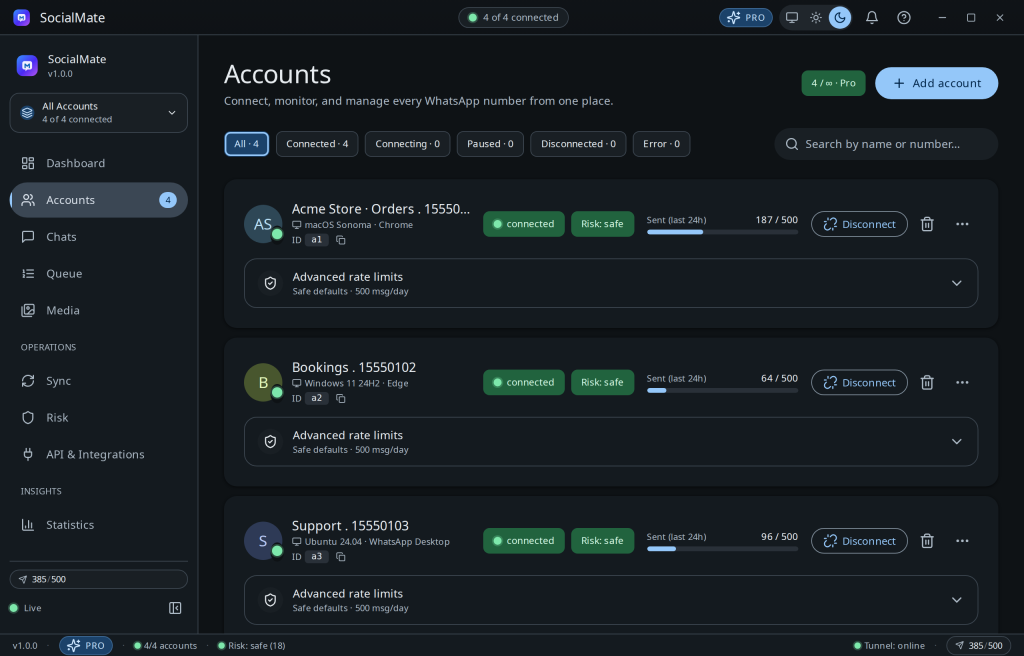
Free runs one WhatsApp account; Pro runs unlimited accounts, each fully independent — its own device fingerprint, warming schedule, rate limits, and risk score. One cockpit, many numbers.
Adding another account
- Click Add account and link the new number by QR or pairing code.
- It’s assigned its own permanent device fingerprint and starts its own 72-hour warm-up.
- It appears in the list with independent stats — connecting one number never affects another.
Tip. Separate numbers by job — e.g. Orders, Bookings, Support — so each builds a consistent, human-looking pattern. Mixing wildly different behaviour on one number raises its risk.
Pro. Unlimited accounts is a Pro feature — and there’s no per-seat or per-number fee. Compare plans →
Scaling for an agency? See Agencies: many numbers, one safe cockpit.
Was this helpful?
Thanks for the feedback!