The API uses x-api-key authentication. Keys are stored SHA-256 hashed (never in the clear), carry per-key permissions, and are individually rate-limited.
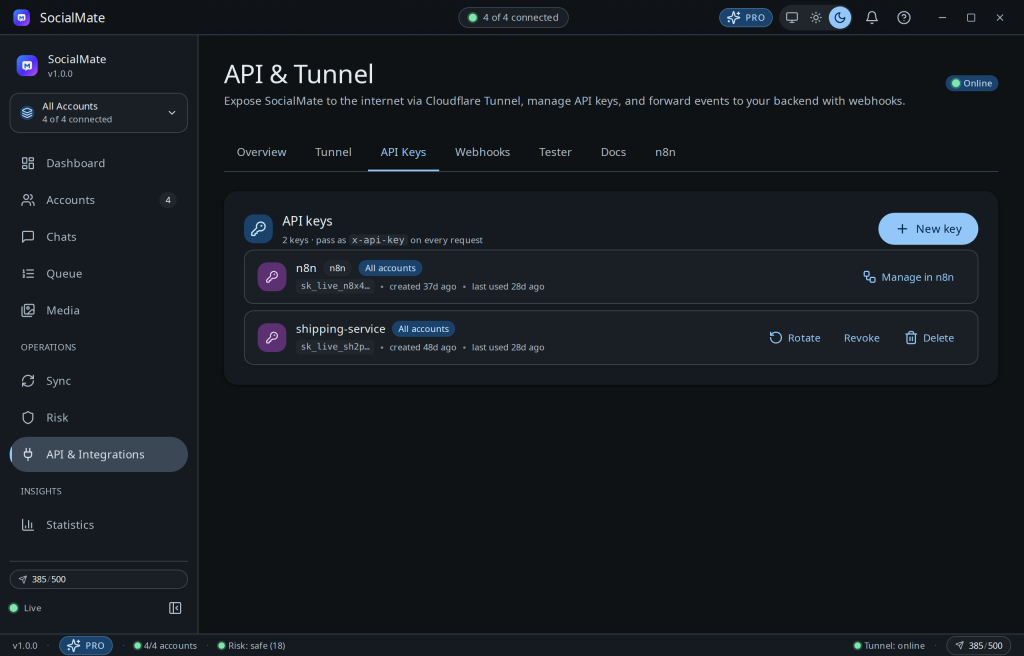
Managing keys
- In Settings → API (or the API page), click Create key and give it a label (e.g. “n8n”, “shipping-service”).
- Copy it once — you’ll only see the full value at creation.
- Send it as the
x-api-keyheader on every request. - Revoke a key any time; revocation is immediate.
Tip. Use one key per integration and label it clearly. If a key leaks, revoke just that one without disrupting your other automations.
Keep keys secret. Treat an API key like a password. Store it in your automation’s secret store or environment variables, never in client-side code or a public repo.
Was this helpful?
Thanks for the feedback!