Webhooks push events from SocialMate to your own URL the instant they happen — inbound messages, delivery results, sync and tunnel state, and more. No polling required.
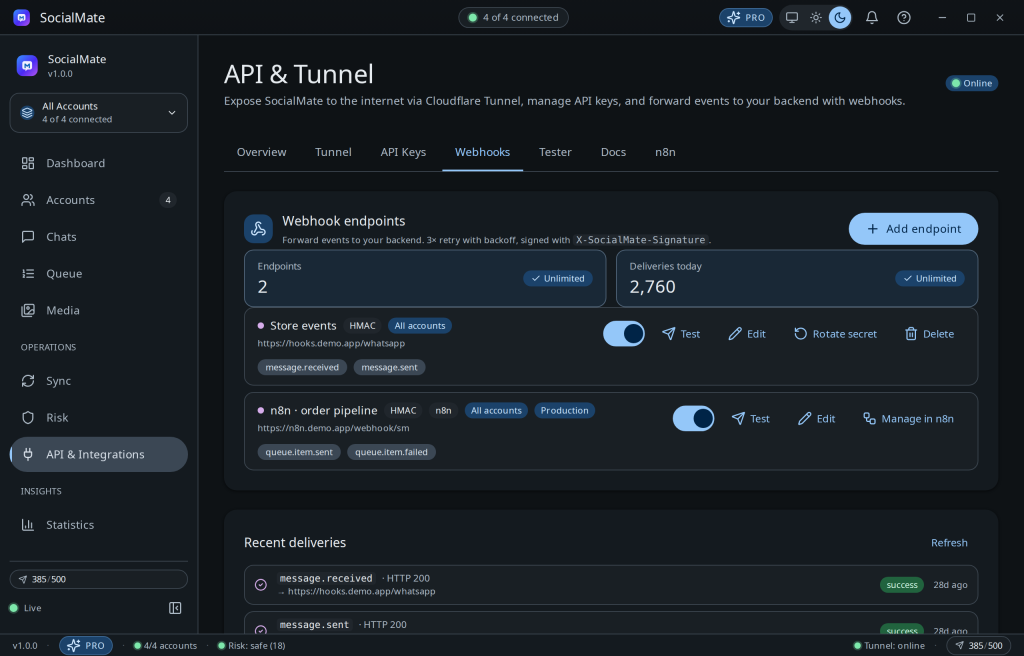
Create an endpoint
- In the API page, open Webhooks → Create and paste your receiving URL.
- Choose which events to subscribe to.
- (Recommended) set an HMAC secret so you can verify each payload’s
HMAC-SHA256signature. - Hit Test to send a sample delivery and confirm your endpoint receives it.
Reliable delivery
Failed deliveries retry with exponential backoff (5s → 25s → 125s), and every attempt is logged so you can debug. Events that carry media (like an inbound photo) wait until the file has finished downloading — usually a few seconds — so the payload arrives with a link you can fetch right away (if a download is genuinely stuck, the event still fires after about two minutes without one). Free allows 2 endpoints, the 9 Free events, and 100 deliveries/day; Pro is unlimited with all 35 events.
Pro. Unlimited webhooks and the full event catalogue are Pro. Compare plans →
Reference: Webhook events reference (35) · Webhooks docs. Troubleshooting: Webhooks aren’t delivering.