It can still happen — no tool is 100% ban-proof. If WhatsApp restricts or bans a number, here’s how SocialMate surfaces it and what to do.
What you’ll see
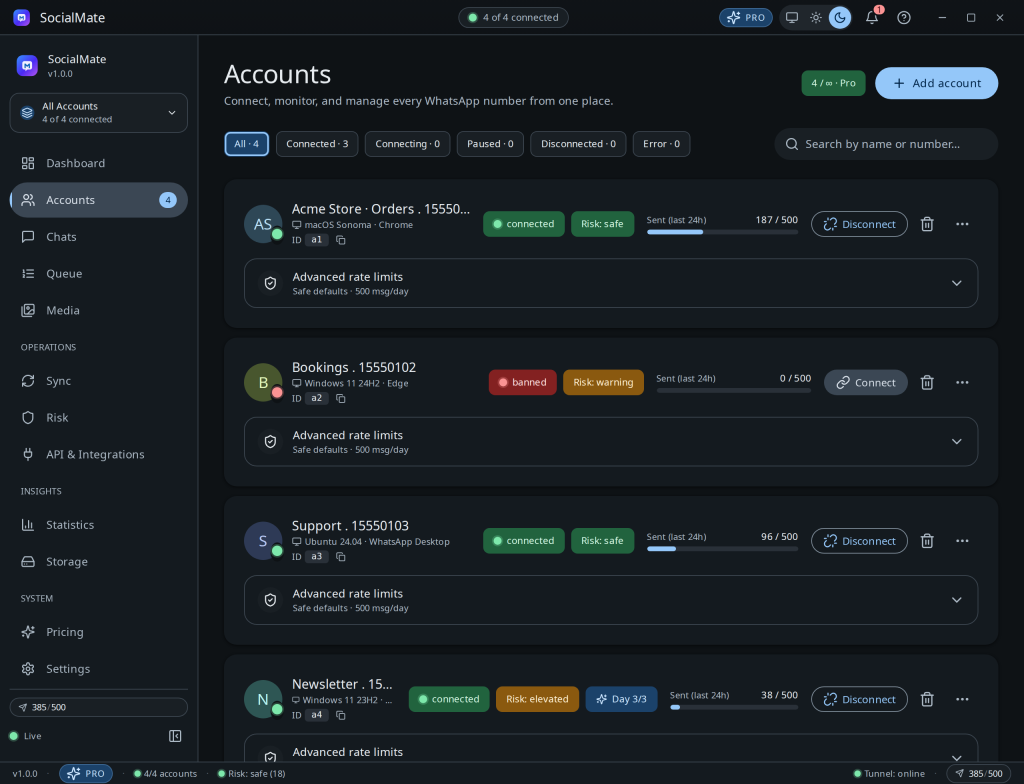
- The account flips to a red banned state, and — on Pro — you’ll get an
account.bannedwebhook if you’re listening for it. (account.bannedis not one of the 9 events Free can subscribe to; on Free you’ll see the state change in the app.) - Sending stops for that number; the dashboard and tray reflect it immediately.
- Your other numbers are unaffected. A ban is per-number — the accounts above and below it keep sending on their own limits and risk scores.
What you can do
- Appeal through WhatsApp. Bans are WhatsApp’s call, not ours — the appeal happens in the WhatsApp app itself. We have no ability to lift a ban.
- Don’t immediately re-link and blast. If you re-link, treat it as a brand-new number: let it warm slowly.
- Review what happened. Check the anti-ban log and your risk history around the ban — velocity, duplicates, or a cold number are the usual culprits.
This is why we say it up front. Don’t automate a number you can’t afford to lose. Keep your most important number conservative, and do your heavier automation on numbers you can replace. See the disclaimer.
Reduce the odds next time
Warm thoroughly, keep velocity human, vary content, respect night pause, and watch the risk cockpit. Start with Warming new numbers.
Was this helpful?
Thanks for the feedback!