Skip to content
SocialMate
Knowledge base Account & licenses

Find or resend your license key

Lost your SM4 key? Copy it from your account or have us resend the email.

1 min read Updated July 14, 2026

Your key is always one click away.
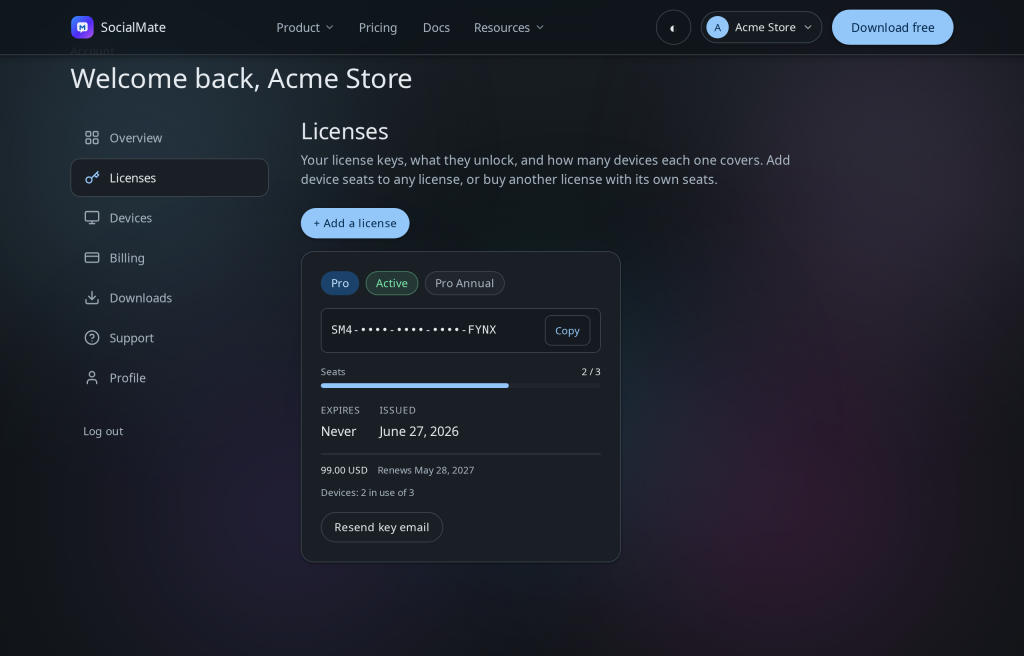
The Licenses tab — copy your key or resend the email.

Find it

  1. Sign in and open the Licenses tab.
  2. Copy your SM4-XXXX-XXXX-XXXX-XXXX key.
  3. Or click Resend key email to get it in your inbox again.

Bought it but never got the email? Check spam, confirm you’re signed in with your purchase email, then resend. Still stuck? Open a ticket — your purchase is on record.

Was this helpful?

Still stuck — open a ticket · Back to all articles

Free forever · no card Download free