WooCommerce, Amelia, Bookly, FluentBooking, Contact Form 7, WPForms, Gravity Forms, Fluent Forms and the WordPress Abilities API — each adds its own messages or agent tools the moment it is active. Your site’s tools are also an MCP server, and any plugin can add its own through a small public API.
Saturday: 10:00, 11:30 or 15:00 with Mona. Which suits you?
11:30 please
book_appointment
Requested ✅ Haircut, Saturday 11:30 — we’ll confirm it here, and you’ll get a reminder before your appointment.
Claude Agent · Model: your choice
WooCommerce
Shipment tracking plugins
Amelia
Bookly
FluentBooking
Contact Form 7 + Flamingo
WPForms
Gravity Forms
Fluent Forms
WordPress Abilities API
Claude Desktop
Cursor
n8n MCP client
Selling
Store
Messages work on every SocialMate plan; agent tools need Pro.
WooCommerce Every plan
Messages: order updates for every status and your custom ones, payment and basket reminders, back in stock, after-purchase follow-ups, checkout opt-in, alerts to you. Tools: products, a customer’s own orders, checkout in the chat and store management.
The “shipped” message reads the tracking number from Advanced Shipment Tracking, WooCommerce Shipment Tracking or YITH order tracking — or from a field the plugin adds for shops with none.
Customers book, check and cancel their own appointments in the chat with the agent (Pro). A booking made, and an appointment coming up, are events on the Events tab — for the person who booked and for you — each a message you write on every plan, or an agent task on Pro.
Amelia Pro
Services, free times, booking and cancelling in the chat; new-booking and reminder events. Amelia’s own WordPress abilities can be used too.
Bookly Pro
Services, free times, booking and cancelling in the chat; new-booking and reminder events.
FluentBooking Pro
Services, free times, booking and cancelling in the chat; new-booking and reminder events. FluentBooking’s own abilities can be used too.
Tools: list_services, find_available_slots, book_appointment, my_bookings, cancel_my_booking and, for you, bookings_on.
Leads
Forms
Everyone who sends a form with their number can get an answer on WhatsApp quickly — your message on every plan, or an agent task on Pro — and you can ask the agent what came in.
Contact Form 7 + Flamingo Pro
Form entries (stored by Flamingo) for you, and a “form sent” event — a message or an agent task.
WPForms Pro
Form entries for you, and a “form sent” event — a message or an agent task.
Gravity Forms Pro
Form entries for you, and a “form sent” event — a message or an agent task.
Fluent Forms Pro
Form entries for you, and a “form sent” event — a message or an agent task.
Entries are owner-only: list_forms, list_form_entries, forms_summary can never be opened to customers. A form can carry anyone’s number, so a reply it causes goes to a number at most once a day.
No shop needed
WordPress itself
Your pages and posts Pro
The agent answers from your published content; owners can draft, publish, schedule and moderate comments from WhatsApp.
Alerts and sign-in Every plan
New accounts, comments waiting, posts published and updates — to your phone — and sign-in with a WhatsApp code.
Every ability a plugin registers can become an agent tool. Customer-facing abilities run as a customer account you pick, with the customer’s WhatsApp number filled in for them.
MCP server
Your site’s tools, in Claude Desktop, Cursor or n8n No server needed
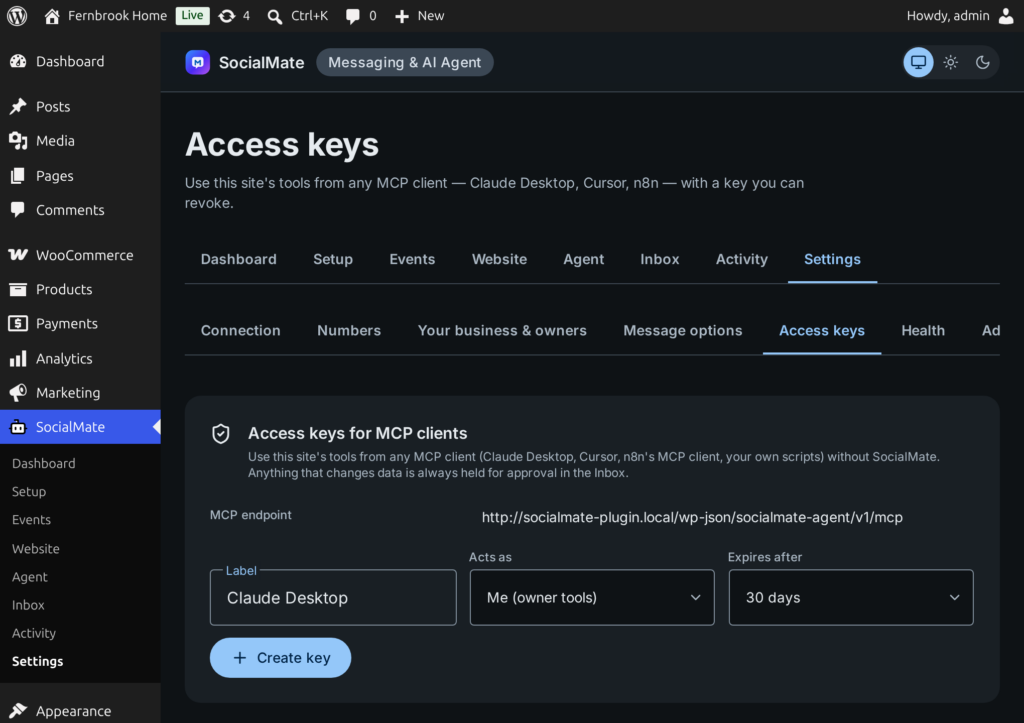
The same tools the agent uses are an MCP server at /wp-json/socialmate-agent/v1/mcp. Create an access key under Settings → Access keys and connect any MCP client — with or without SocialMate.
A key acts as you (owner tools) or as a customer (customer tools only)
Keys expire after 7, 30 or 90 days, or never — your choice
Anything that changes data is always held for your approval in the Inbox
Settings → Access keys: the MCP endpoint and its keys
Developer API
Add your own tools and events
Three public functions, stable names. A complete real-estate example ships in examples/real-estate-pack.php.
socialmate_agent_register_tool()
One tool: a name with your prefix, an object input schema, the lanes that may use it, read or act, and a handler.
socialmate_agent_register_pack()
A named group of tools and events, shown to the site owner as one card under Agent → What it may do.
socialmate_agent_emit()
Tell SocialMate something happened, so a bound agent job can act. The recipient comes from your record, never from a model.
add_action('socialmate_agent_register_tools', function () {
    socialmate_agent_register_tool('recrm_find_listings', [
        'label'        => 'Find listings',
        'description'  => 'Search available listings by area and budget.',
        'input_schema' => [
            'type' => 'object', 'additionalProperties' => false,
            'properties' => [
                'area'      => ['type' => 'string'],
                'max_price' => ['type' => 'number'],
            ],
        ],
        'lanes'   => ['customer', 'owner'], // who may use it
        'effect'  => 'read',                // read | act
        'handler' => fn (array $args, $ctx) => my_crm_search($args),
    ]);
});

// A viewing tomorrow: the phone comes from YOUR record.
socialmate_agent_emit('recrm.viewing_tomorrow',
    ['phone' => $lead->phone, 'name' => $lead->name],
    ['listing' => $listing->title, 'starts' => $viewing->start]
);
Checked at registration
Customer-lane tools may not accept identity or recipient arguments (phone, email, user_id, chat_id …); read the customer from socialmate_agent_context() instead.
Acts start off
A tool that changes something is off until the site owner turns it on, and can be held for approval.
Rejections are visible
A tool that breaks a rule is refused, and Agent → What it may do says why.
Amelia, Bookly and FluentBooking. A booking made and an appointment coming up are events you can answer with your own message on every plan. With SocialMate Pro, customers can also see services and free times, book, check and cancel their own appointments in the chat, and any booking event can be an agent task.
Which form plugins does it work with?
Contact Form 7 (entries stored by Flamingo), WPForms, Gravity Forms and Fluent Forms. A form sent can get your own WhatsApp reply on every plan, or be an agent task on Pro (the “Reply to form leads” job sets that up), and you can ask the agent about entries — customers never can.
Do I need to configure each integration?
No. Packs appear when the plugin they read from is active. Every event is off and every changing tool is off until you choose it, or until a one-click job turns on exactly what it needs.
What is the WordPress Abilities API support?
On WordPress 6.9 and later, abilities registered by WordPress or other plugins can become agent tools. Customer-facing abilities run as a customer account you choose, with the customer’s WhatsApp number filled in for them.
Can my own plugin add tools for the agent?
Yes, with socialmate_agent_register_tool(), socialmate_agent_register_pack() and socialmate_agent_emit(). A complete example ships in examples/real-estate-pack.php.
Is there a native Shopify or HubSpot integration?
Not in the WordPress plugin. The Claude Agent in the SocialMate app can reach services like those through generic MCP connectors; n8n is the only native node integration.
Install the free plugin, connect it to SocialMate with one token, and choose what should happen for each event. Messages work on every plan; the Claude Agent comes with Pro.