SocialMate – Messaging & AI Agent · Events and messages
The Events tab
Every event: off, a message, or an agent task.
The Events tab is one list of everything that can happen on your site — an order placed, a basket left, a booking made, a form sent, a comment waiting, any plugin’s own action. For each event you choose exactly one thing:
- Off — nothing happens.
- Every plan Send a message — your own words, with merge tags filled in from the event.
- Pro Agent task — an instruction to the Claude Agent about that person; the agent writes and sends the message.
One choice per event, so a customer is never told the same thing twice. Every event is off until you choose; Setup pre-picks the recommended ones. The person’s number always comes from the event itself, never from the AI.
Before you start
- The plugin connected to SocialMate. Events that happen before you connect are not kept.
- For anything addressed to you: your own numbers under Settings → Your business & owners → Your numbers.
- For agent tasks: SocialMate Pro, an agent on your number, and The agent on this site switched on under the Agent tab (Set up the agent).
Where each event lives
| Tab | What is on it |
|---|---|
| Overview | What has to be true before anything sends, and what was sent since. |
| WooCommerce | Its own row: Orders · Payment & delivery · Baskets & follow-ups · Alerts to you (a new order, a payment somebody says they made, low stock). |
| Bookings | A booking made, and an appointment coming up (24 hours and 2 hours before) — each with “tell them” and “tell me”. Amelia, Bookly and FluentBooking are listed once, not per plugin. |
| Forms | A form sent — “tell them” and “tell me”. Contact Form 7, WPForms, Gravity Forms and Fluent Forms; the number comes from the form’s phone field. |
| This website | WordPress alerts to you: a new account, a comment waiting, any comment, something published, updates waiting. |
| Other plugins | Any plugin’s own actions, read from its code — each with “tell them” and “tell me”. |
A tab appears only when its plugin is active — no WooCommerce, no WooCommerce tab.
Choose what happens
1Find the event
Open SocialMate → Events and the tab the event is on. On Other plugins, type in Find an event to filter; under each event you see when it last happened.
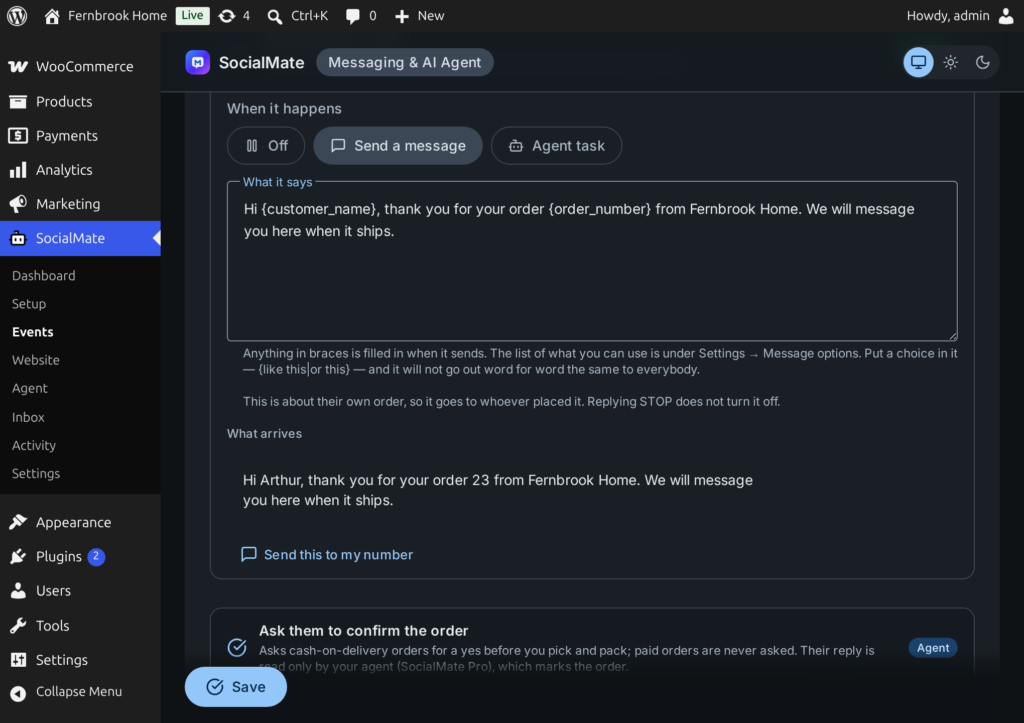
2Pick Off, Send a message or Agent task
Under When it happens:
- Send a message — write What it says. Merge tags are filled in when it sends:
{customer_name},{order_number},{order_total},{items},{pay_link},{tracking_url},{cart_link},{product_name},{product_link}. Booking and form events use their own details, such as{service},{starts}and{title}, plus{customer_name}and{site}. On the WooCommerce events, Send this to my number shows exactly what arrives. - Agent task — write What the agent should do for this person (or, for an event told to you, What the agent tells you), e.g. “Thank them for booking, confirm the service and time, and say how to reach us if they need to change it.” Leave it empty and the agent does its usual job for that event. It gets the event’s details and writes only to the number on the event.
Press Save.
3Other plugins: point at the number
A plugin’s own actions are read from its code, so any plugin works — even one SocialMate has never heard of. SocialMate starts listening to an action only once you choose something for it. Each action has a “tell them” and a “tell me” row, and:
- Their number is in — Find it automatically, or pick the field that holds the person’s number (the fields appear after the action has happened once).
- How often — Once per record (booking, entry…) and change, or Every time it happens.
- Wait before it goes (minutes).
4See what went out
Messages are listed under Activity → Messages sent (see Sending pace and Messages sent). Agent tasks are under Activity → Agent tasks sent, as sent, waiting or failed, with Retry for a failed one.
Good to know
Messages work on every SocialMate plan; Agent task needs Pro. With the agent switched off under Agent → The agent on this site, events set to Agent task send nothing — messages you wrote still send.
- No number in the event, nothing goes out. An event told to you goes to your own numbers only.
- Anyone can type someone else’s number into a form or a booking, so a message caused by a website visitor goes to a number at most once a day, and one visitor can cause at most five an hour — even if the form had a WhatsApp tick.
- The Ask them to confirm the order event (WooCommerce → Orders) holds the switch that keeps cash-on-delivery orders on hold until the customer confirms.
- SocialMate is a desktop app that may be closed for a weekend: agent tasks wait on your site and are retried for up to three days.
- The agent writes and sends within its own limits and the number’s sending pace.